The best digital smile design software for a US dental practice is the one your team will actually use. Dr. Joyce Kahng puts it plainly: prioritize usability, chairside speed, and scanner compatibility over feature counts. Here is a defensible shortlist to trial today:
- DSDApp (Digital Smile Design) — Protocol-driven, face-first planning with integrated lab workflows; best for interdisciplinary cases.
- 3Shape TRIOS Smile Design — Plugs directly into TRIOS scanner data for fast photo-to-scan chairside demos.
- exocad Smile Creator — Deep CAD/CAM export control; built for restorative practices handing off to labs or mills.
- Smile Designer Pro (SDP) — Fast 2D/3D mockups optimized for patient presentations during consults.
- Planmeca Romexis Smile Design — All-in-one imaging-to-CAD suite for practices already in the Planmeca ecosystem.
- SmileViz — AI previews in seconds; the go-to for cosmetic consults where speed drives case acceptance.
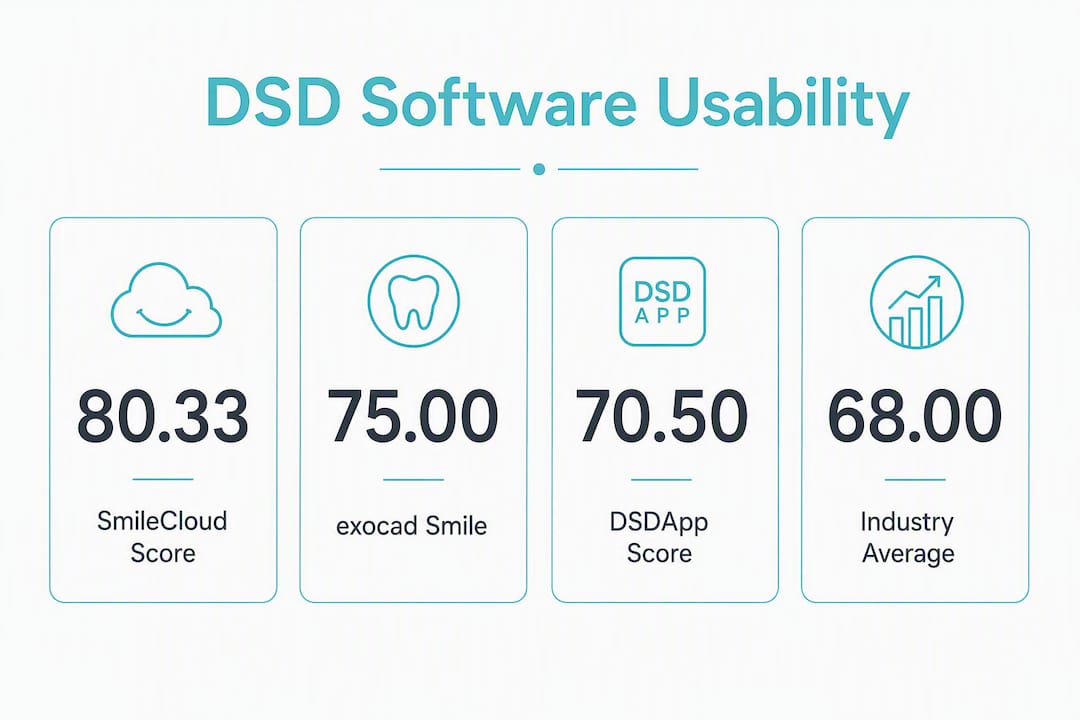
- SmileCloud — Cloud-first collaboration connecting clinicians, labs, and specialists; scored highest in independent SUS testing with a mean score of 80.33.
- DTS PRO — Simulations that feed directly into printable mockups and clinical execution guides.
- Medit Smile Design — Free or low-cost within Medit Link; solid for Medit scanner users who want zero added overhead.
- PreVu — Fastest patient-facing visual tool; no lab export depth, but nothing beats it for a quick consult preview.
Two metrics to track during any trial: time-to-first-simulation (under five minutes is the target) and case-acceptance delta across three to five pilot consults.
Pro Tip: Run two platforms in parallel on real consult cases before committing. The one your front-desk team can explain to a patient without your help is usually the right call.
How do the leading digital smile design programs compare?
The table below maps the ten platforms on the dimensions that affect daily adoption. Confirm scanner compatibility directly with your current scanner vendor during any demo.
| Software |
Best for |
Ease of use |
Scanner/file compatibility |
2D vs 3D |
CAD/CAM & lab export |
Platform |
Pricing & trial |
Training & CE |
HIPAA/data hosting |
| DSDApp |
Interdisciplinary, face-driven planning |
Moderate learning curve |
STL/DICOM; open import |
2D + 3D wax-up |
Lab workflow integration |
Cloud + desktop |
Subscription; demo available |
Vendor certification program |
Cloud; HIPAA compliance stated |
| 3Shape TRIOS Smile Design |
TRIOS scanner clinics |
Low (within TRIOS ecosystem) |
Native TRIOS; STL/OBJ |
2D photo + 3D scan overlay |
Limited direct CAD export |
Desktop/networked |
Subscription; trial via 3Shape |
3Shape Academy CE |
Cloud sync; HIPAA addressed |
| exocad Smile Creator |
Restorative/lab handoff |
Moderate |
STL/OBJ; broad compatibility |
2D + full 3D |
Strong STL/CAD export |
Desktop |
Lab/clinic licensing; demo available |
Vendor training; partner CE |
Local/server; HIPAA configurable |
| Smile Designer Pro |
Patient consult presentations |
Low |
Photo-based; limited scanner import |
2D + basic 3D |
Limited lab export |
Desktop/cloud |
Subscription; free trial |
Online tutorials |
Cloud; HIPAA compliance stated |
| Planmeca Romexis |
Planmeca imaging ecosystem |
Moderate |
DICOM/STL; Planmeca native |
2D + 3D CAD |
Full CAD/CAM output |
Desktop |
Bundled with Planmeca hardware |
Planmeca Academy; CE available |
Local/cloud; HIPAA configurable |
| SmileViz |
Fast cosmetic consults |
Very low |
Photo-based |
AI 2D preview |
Minimal |
Cloud |
Subscription; free trial |
Minimal vendor training |
Cloud; HIPAA stated |
| SmileCloud |
Multi-stakeholder collaboration |
Low (SUS 80.33) |
Photo + 3D reference; STL |
2D + 3D reference |
Collaboration-focused; limited direct CAD |
Cloud |
Subscription; trial available |
Vendor onboarding |
Cloud; HIPAA compliance stated |
| DTS PRO |
Mockup-to-execution workflow |
Moderate |
STL; photo-based |
2D + printable guides |
Printable mockup/guide export |
Desktop |
Subscription; demo available |
Vendor support |
Local/cloud; HIPAA configurable |
| Medit Smile Design |
Medit scanner users |
Very low |
Native Medit Link; STL |
2D simulation |
Limited |
Cloud (Medit Link) |
Free/low-cost within Medit |
Medit Academy |
Cloud; HIPAA addressed |
| PreVu |
Quick patient-facing visuals |
Very low |
Photo-based |
2D only |
None |
Cloud |
Low-cost subscription |
Minimal |
Cloud; HIPAA stated |
Practical trade-offs to weigh:
- Chairside speed vs. lab-ready control: SmileViz and PreVu win on speed; exocad and DSDApp win on restorative depth. Few practices need both from one tool.
- AI preview realism vs. manual control: AI-assisted platforms speed design and improve patient engagement, but peer-reviewed evidence remains heterogeneous. Treat AI outputs as starting points, not final designs.
- Cloud collaboration vs. local HIPAA considerations: SmileCloud and DSDApp host data in the cloud with stated HIPAA compliance. exocad and Planmeca Romexis support local or server-based hosting for practices with stricter data policies. Verify the vendor’s current data-hosting statement before signing.
Key Takeaways
DSDApp, SmileCloud, and exocad Smile Creator cover the three core use cases — interdisciplinary planning, team collaboration, and restorative lab handoff — and all scored above the 68-point SUS usability benchmark in independent testing.
| Point |
Details |
| Trial two platforms in parallel |
Run three pilot consults per tool; measure time-to-first-simulation and case-acceptance rate. |
| Confirm STL/DICOM export and HIPAA hosting |
Verify file compatibility and data-hosting policy with the vendor before purchasing. |
| SUS scores predict adoption |
All tested tools exceeded the 68-point usability benchmark; SmileCloud led at 80.33. |
| Red flags to stop a trial |
Hidden licensing fees, poor scanner import, no vendor CE, or no HIPAA documentation. |
| Onewd CE accelerates adoption |
Pair any software trial with hands-on cosmetic dentistry CE to shorten the learning curve. |
Why hands-on training matters more than the feature list
The SUS-based usability study that scored SmileCloud at 80.33 and placed every tested platform above the 68-point adoption threshold makes one thing clear: the gap between tools is smaller than most clinicians expect. What separates a practice that closes cosmetic cases from one that doesn’t is rarely the software. It’s whether the whole team uses it consistently.

AI-assisted design reduces time at the screen, but peer-reviewed caution is warranted. Clinicians who rely on AI outputs without adjusting for facial landmarks and tooth proportion produce generic results patients can spot. The learning curve is real, and it’s routinely underestimated.
Mentorship-driven CE is the fastest correction. A structured hands-on course forces you to apply esthetic principles to live cases, not demo photos. That’s where the difference between a convincing simulation and an over-designed, artificial result becomes obvious. Software trials without training tend to plateau at “good enough for a demo” rather than reaching “closes the case.”
Pro Tip: Before enrolling in any DSD software subscription, complete at least one hands-on CE module that includes live patient workflows. The software will make more sense, and your case-acceptance numbers will reflect it faster.
Sharpen your DSD skills with Onewd before you buy
Choosing software is step one. Knowing how to use it on a real patient is step two, and most clinicians skip straight to step one.
Onewd’s cosmetic dentistry training courses pair on-demand modules with live patient sessions and mentorship, so you build the clinical judgment that makes any DSD tool work. Whether you’re trialing DSDApp, SmileCloud, or exocad, the esthetic principles you apply at the chair are the same. Enroll in a CE module before your trial period ends, and you’ll know exactly which platform fits your workflow rather than guessing after you’ve signed a contract. Browse available CE formats and credits to find the right starting point.
Research-backed sources to consult during your trial
- Digital Smile Design — PMC — Peer-reviewed overview of DSD development, 2D/3D workflow evolution, and commercially available tools.
- Comparative Usability Evaluation of Three DSD Software Tools Using the System Usability Scale — SUS scores for SmileCloud, Preteeth AI Pro, and Medit Link; essential reading before finalizing a shortlist.
- AI in Digital Smile Design — Springer — Narrative review of AI integration, workflow benefits, and clinical limitations.
- Best Smile Simulation Software for Dentists — Clinician-focused editorial shortlist with usability and chairside-speed framing.
- Best Dental Case Presentation Software — Practitioner-reported correlation between fast simulations and case-acceptance rates.
On vendor pages, verify:
- Current scanner compatibility list (TRIOS, iTero, Medit, or open STL/DICOM import)
- HIPAA compliance statement and data-hosting location (cloud vs. local server)
- Trial account availability and duration
- CE or certification programs tied to the software
- Published before-and-after case galleries or peer-reviewed clinical examples
Recommended